
Your history setting
Your company chooses how long the detailed route of each vehicle (its positions) is kept: 30 days, included in the plan, or 3, 6 or 12 months with the Longer history add-on.
- Where to see it: Admins see it on Vehicles, on the Settings tab, in the Position history card (Positions kept), read-only, with "To change this, contact …".
- Everyone sees it on the date pickers of the replay, reports and alerts ("History goes back 30 days"), which offer no older day.
- Kept longer than the setting: each vehicle's trips and stops, with their distances, and your alerts. An old day's replay then lists its trips and says "This day's route is no longer available".
Steps
- Admins: open Vehicles, then the Settings tab.
- Read Positions kept on the Position history card.
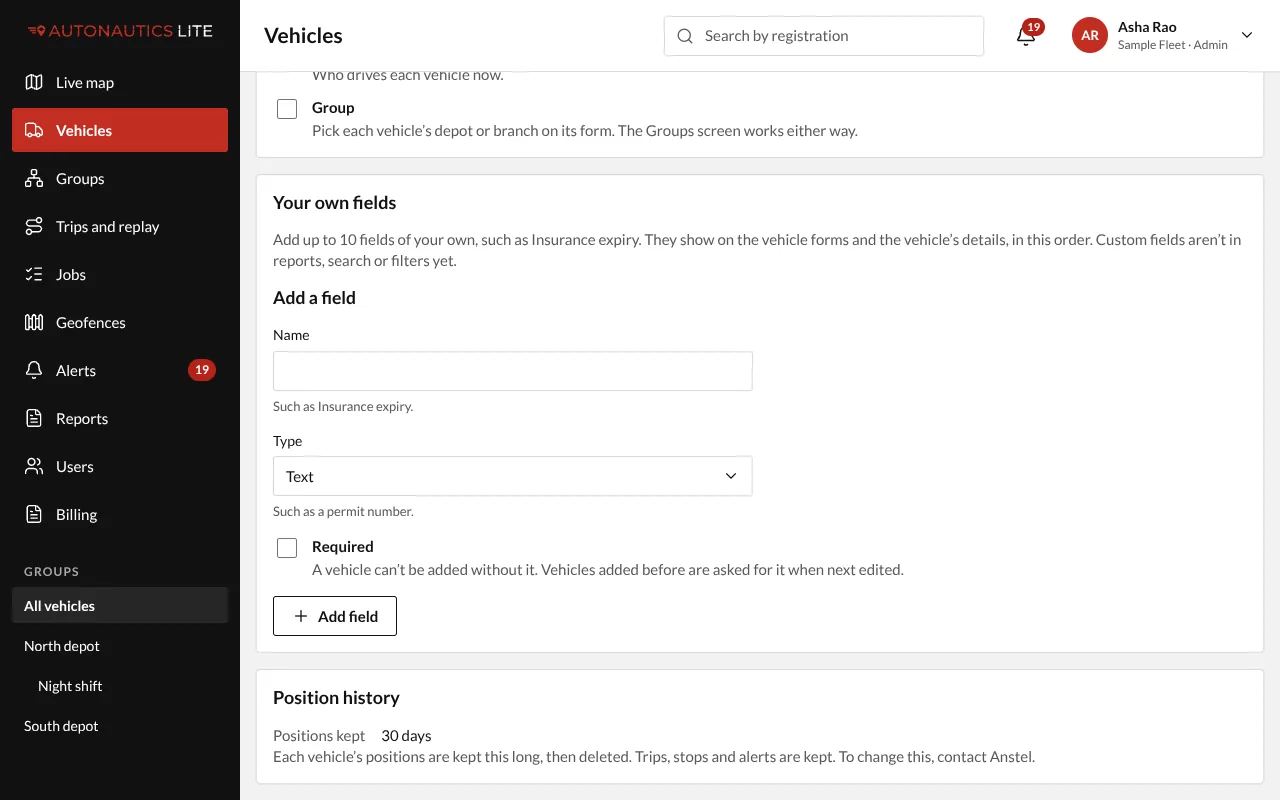
- To change it, contact your provider.
To change it, contact your provider. Raising it works from then on: routes already deleted can't be brought back. Lowering it waits 7 days before anything is deleted, so a mistake can be undone.
Add-ons
Anything with a real outside cost is a paid add-on, switched on by your provider. Today that is Longer history (3, 6 or 12 months).
To add one, contact your provider.