
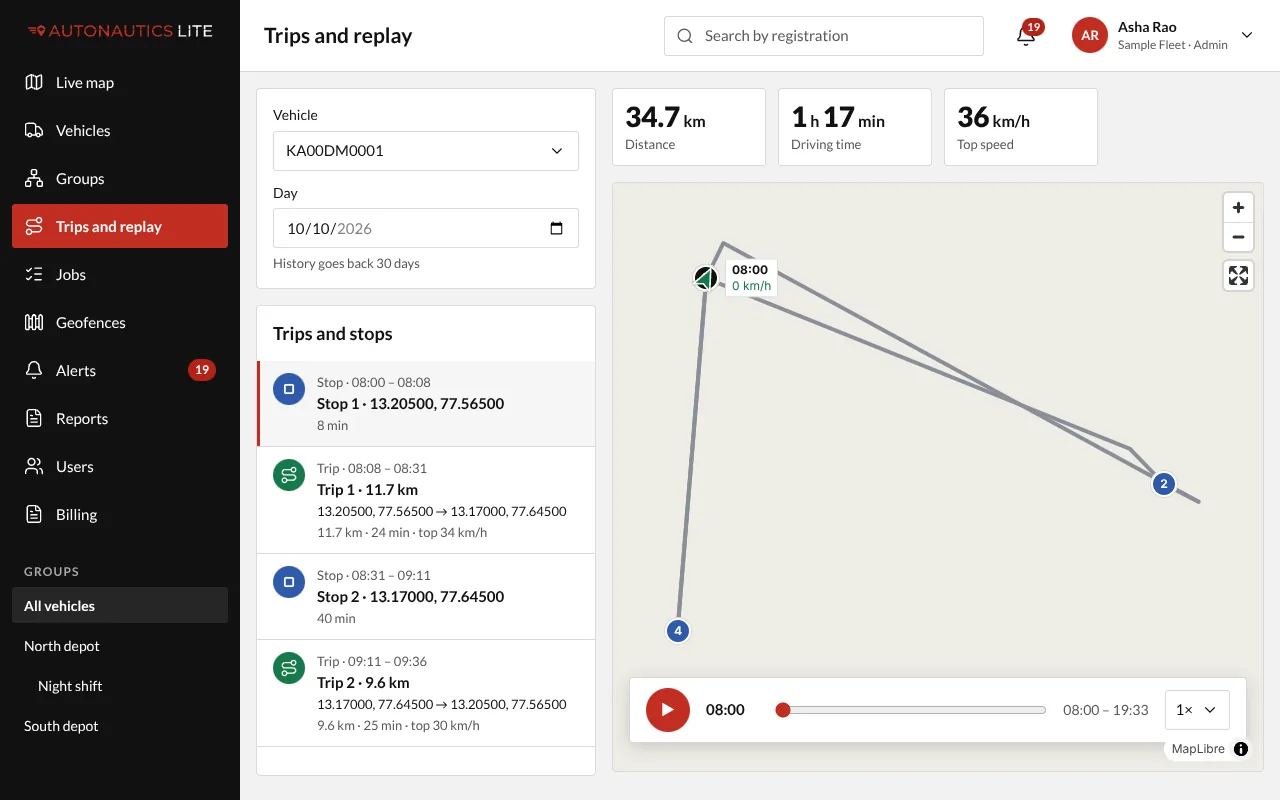
Trips and replay plays back where a vehicle went on any day, with its trips, stops and distance.
Steps
- Open Trips and replay (Replay in a phone's bottom menu).
- Choose the Vehicle and the Day.
- Press Play. The vehicle moves along its route, a minute of the day each second. Choose a faster speed, up to 64×, to skip through it.
- Click a trip or a stop in the list to see just that part of the day on the map.
From the live map: hover over a vehicle and press Replay today.
What you see
- The day in numbers: distance, driving time and top speed.
- Trips and stops, one after the other, each with its times and places. A short halt, such as at traffic lights, stays inside its trip: a stop is 5 minutes or longer.
Good to know
- How far back you can go depends on how long your company keeps its history: 30 days, or 3, 6 or 12 months. The day picker says so, and offers no older day. See How long your history is kept, and your add-ons.
- "This day's route is no longer available": the detailed route of that day has passed your history setting, but its trips, stops and distances are kept.
- A vehicle that was out of mobile signal fills in its trips once it reports again.