
Each vehicle uses one licence. A licence is ₹99 per vehicle a year, including GST. All your licences end on one renewal date, so licences you buy mid-year cost only the days left to it.
Steps
- Open Billing in the menu. (When all your licences are in use, Buy licences on the add form opens it too.)
- Under Buy more licences, choose How many licences.
- Check the amount: the licences, the days to your renewal date, and the GST.
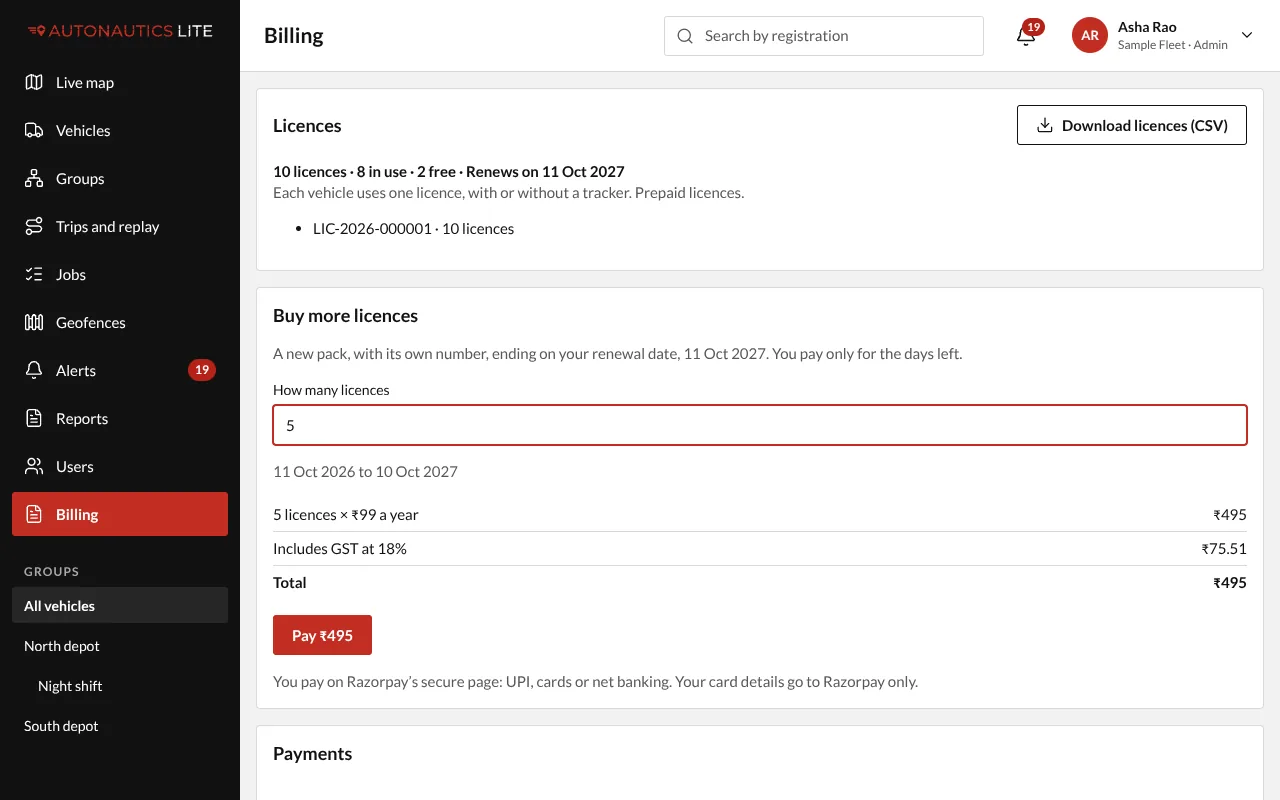
- Press Pay ₹… (the button shows the total). Razorpay's secure page opens: pay by UPI, card or net banking.
Back in the app, the screen says "Payment received, adding your licences…". They are added as soon as Razorpay confirms the payment, usually within a minute.
What you get
- A new pack of licences with its own number, such as LIC-2026-000123, ending on your renewal date.
- The pack number shows on your Razorpay receipt, under Payments on Billing, and on your GST invoice.
- The Licences card shows how many you hold, how many are in use and how many are free, and Download licences (CSV) lists each licence and its vehicle.
Good to know
- Your card details go to Razorpay only, never to the app.
- Paid twice by mistake (two tabs)? Billing shows "Paid twice: … refunds it", and the second payment is refunded.
- Removing a vehicle frees its licence for the next one.